Your AI visibility data, inside any AI assistant

The ClayHog MCP server connects your brand, competitor, and citation data to Claude, Cursor, ChatGPT, n8n, and more. Ask questions, pull reports, and create content right where you already work.

Claude · ClayHog MCP
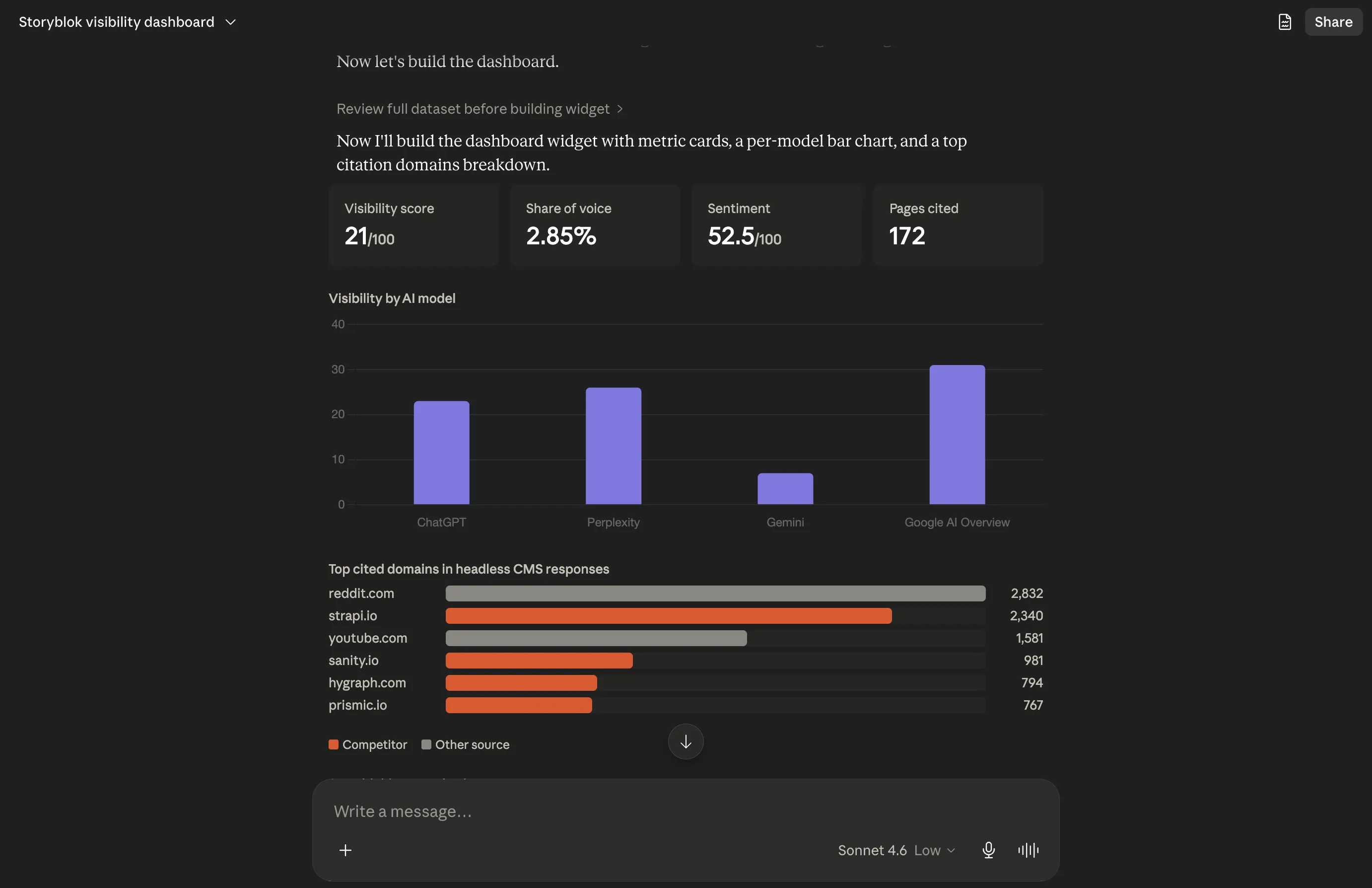
Claude using the ClayHog MCP server to build an AI visibility dashboard with metric cards, a per-model bar chart, and top cited domains

Works where you work

Connect ClayHog data with your most powerful tools

Claude
ChatGPT
Cursor
Windsurf
VS Code
n8n
Raycast
Any MCP client
{
  "mcpServers": {
    "clayhog": {
      "url": "https://mcp.clayhog.com/mcp"
    }
  }
}

Add it to your AI tool's MCP config. One line for the hosted server.

Use cases

Workflows you can run in minutes

Real prompts built on the ClayHog MCP. Drop one into your assistant and get an answer back.

Weekly brief

Summarize my brand's AI search week in one query.

Pull visibility analytics, competitive standings, and top citation sources into a ready-to-share report.

Competitor watch

Which competitors gained share of voice on Perplexity this month?

Run side-by-side comparisons across ChatGPT, Gemini, Perplexity, Claude, and AI Overviews.

Content pipeline

Pick a winning prompt, outline it, write it, then GEO-optimize.

Go from a tracked prompt to a fully optimized article without leaving your assistant.

Topic research

Find topics and questions where competitors dominate AI answers.

Surface People Also Ask questions, SERP gaps, and the sources shaping a topic.

Citation sources

Show the domains AI models cite most for my topics.

See which pages and domains AI engines trust, and where your own content is cited.

New brand setup

Spin up a brand, add competitors, and start a scout.

Onboard a brand end-to-end: competitors, suggested prompts, and a scheduled monitor.

How-to guide

Connect in 3 steps.

01

Connect

Add the ClayHog MCP server to your AI tool. Use the hosted URL or run it locally with npx.

02

Authorize

Sign in with your ClayHog account, or drop in a personal access token from Settings.

03

Ask a question

Ask about visibility, competitors, citations, or content in plain language and get real answers.

What you can ask

Your full AI visibility platform, in the chat

Brand visibility

Analytics, scores, and trends across every AI platform.

Competitor analysis

Rankings, share of voice, and side-by-side comparisons.

Prompts & scouts

List, create, and schedule the prompts you track.

Responses & citations

Full AI responses with cited domains and sources.

Content & GEO

Draft, optimize, and analyze content for AI search.

Topic research

Topics, PAA questions, and SERP competitive gaps.

OAuth secured 60+ tools

Frequently Asked Questions

Quick answers about the ClayHog MCP server

What is the ClayHog MCP server?

It is a Model Context Protocol server that connects your ClayHog account to AI assistants. Once connected, you can ask plain-language questions and your assistant pulls real data from your brands, scouts, competitors, and content.

Which tools does it work with?

Any tool that supports MCP. We have setup guides for Claude, Cursor, VS Code, and Windsurf, and it also works with automation tools like n8n and any other MCP-compatible client.

How do I set it up?

Add the ClayHog server to your AI tool's MCP config, authorize with your ClayHog account or a personal access token, and start asking questions. The hosted URL takes one line of config.

What can I do with it?

Check brand visibility, compare competitors, analyze cited sources, research topics, and create or optimize content, all across ChatGPT, Gemini, Perplexity, Claude, and Google AI Overviews.

Is it secure?

Yes. The hosted server uses OAuth, so your token is never passed through tool arguments. If you self-host, credentials are set as environment variables in your own MCP client config.

What do I need to get started?

A ClayHog account with at least one brand, plus an AI tool that supports MCP. Generate a personal access token in Settings > Access Tokens when you set things up.

Start asking your assistant about your AI visibility

Connect ClayHog over MCP and turn brand monitoring into a conversation. Free 7-day trial, no credit card required.